How do cloud providers virtualize machines? They use KVM
Running Docker within Docker sounds like an intriguing idea, but it comes with lots of problems, especially with network and disk usage. So, how do cloud providers like AWS and Google Cloud virtualize machines? Do they use VMware? No. They use KVM.
Cloud providers usually run big server CPUs with high core counts (32–128 cores). In order to sell them to customers in small quantities, they virtualize the CPU using KVM. So, how does KVM work? It depends on the need.
Three tiers of “CPU” you can buy
- Shared vCPUs: Many customers share the same cores. You get a baseline (say, 10% of a core) and can burst higher when neighbors are idle. Cheap, but your performance depends on who’s next to you. Think AWS t3 or GCP e2-micro.
- Dedicated vCPUs: Each vCPU is pinned to its own hardware thread and never shared. You still sit on a hypervisor, but with a guaranteed slice. This is what most standard instances are.
- Bare metal: No hypervisor at all. The whole physical CPU is yours, every core, every cache. Maximum control, maximum cost.
A few things about how KVM makes this work
- KVM isn’t a separate operating system. It’s a small module inside the Linux kernel that turns Linux itself into a hypervisor. The “master” OS on the physical server is just a regular Linux install.
- Every virtual machine is simply a Linux process on that host. Each vCPU inside the VM is one thread of that process.
- The trick: a vCPU isn’t a physical CPU core, it’s a thread. The Linux scheduler decides which thread runs on which core and for how long, the same way it schedules any other program.
- On x86, one vCPU usually equals one hyperthread, not one full core. A “2 vCPU” instance is typically one physical core with both threads.
- The guest OS runs directly on the CPU at full speed most of the time. Only when it tries to touch shared hardware (disk, network) does control briefly return to the host, which handles the request and resumes the guest. Overhead is typically 2–5%.
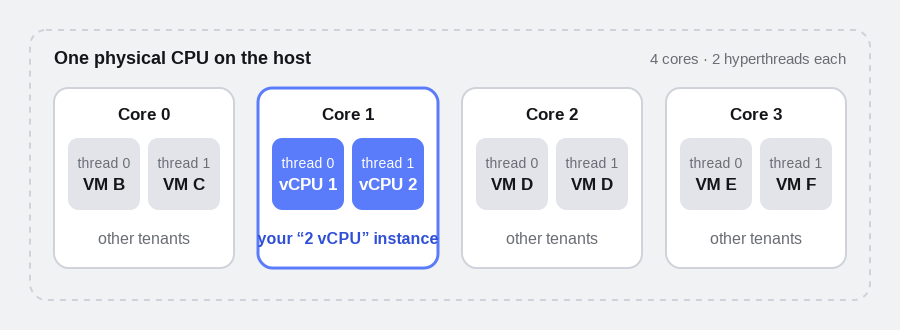
Here’s what that looks like on the host. There’s no special VM object anywhere, just processes and threads, and the same scheduler that runs everything else:
flowchart TB
subgraph host["Physical server: Linux kernel + KVM module"]
  subgraph vma["VM A: one process"]
    a0["vCPU 0: thread"]
    a1["vCPU 1: thread"]
  end
  subgraph vmb["VM B: one process"]
    b0["vCPU 0: thread"]
  end
  sched{{"Linux scheduler"}}
  a0 --> sched
  a1 --> sched
  b0 --> sched
  sched --> c0["Core 0: hyperthreads 0 and 1"]
  sched --> c1["Core 1: hyperthreads 0 and 1"]
endYou can see some of this from inside your own VM. lscpu tells you which hypervisor you’re on and how many threads per core you got. And top has a column most people never look at: st, steal time. It’s the share of time your vCPU was ready to run, but the host gave the core to someone else. On a shared vCPU instance with busy neighbors that number climbs, and your app gets slower without a single change in your code.
lscpu | grep -E 'Hypervisor|Thread|Core|Socket'# Hypervisor vendor:   KVM# Thread(s) per core:  2# Core(s) per socket:  1# Socket(s):           1
top -bn1 | grep Cpu# %Cpu(s): 12.5 us,  2.1 sy,  0.0 ni, 79.8 id,  0.1 wa,  0.0 hi,  0.2 si,  5.3 st
So the next time you spin up a 2-core instance, remember: you’re renting two threads and a very good scheduler.